
Appearance
Files Leathercase reads
This page lists the files Leathercase reads, how it turns each kind into scenes, chapters and parts, and what it leaves alone. Every file here is read only. Leathercase never saves over a manuscript, never converts it and never moves it; it writes only its own files, which are listed in Files Leathercase writes.
The short list
| Format | Files | Read as | Opens in, from the manuscript |
|---|---|---|---|
| Markdown | .md | Notes: front matter, headings, prose, links, comments | Obsidian, iA Writer, Typora, Visual Studio Code, Sublime Text, Zed, or your default app |
| Word | .docx | Notes: headings from the paragraph styles, prose, emphasis, quotes | Microsoft Word, LibreOffice Writer, or your default app |
| Scrivener | a .scriv project (Scrivener 3 and 2) | One note per text item in the binder, in binder order | Scrivener |
| Fountain | .fountain | A screenplay: sections and sluglines as scenes, cues as the cast, sluglines as places | Visual Studio Code, Sublime Text, Zed, Highland, Fade In, or your default app |
A story can mix them. A folder of Word chapters with Markdown character notes is one story; so is a Fountain script with a Markdown bible beside it.
Everything else in the folder is listed and left alone: images, PDFs, spreadsheets, .txt, .rtf files outside a Scrivener project, .odt, the older Word .doc. They never become scenes and Leathercase never opens them. How this story is read counts them under Notes left out as "other files no pattern reads, such as images".
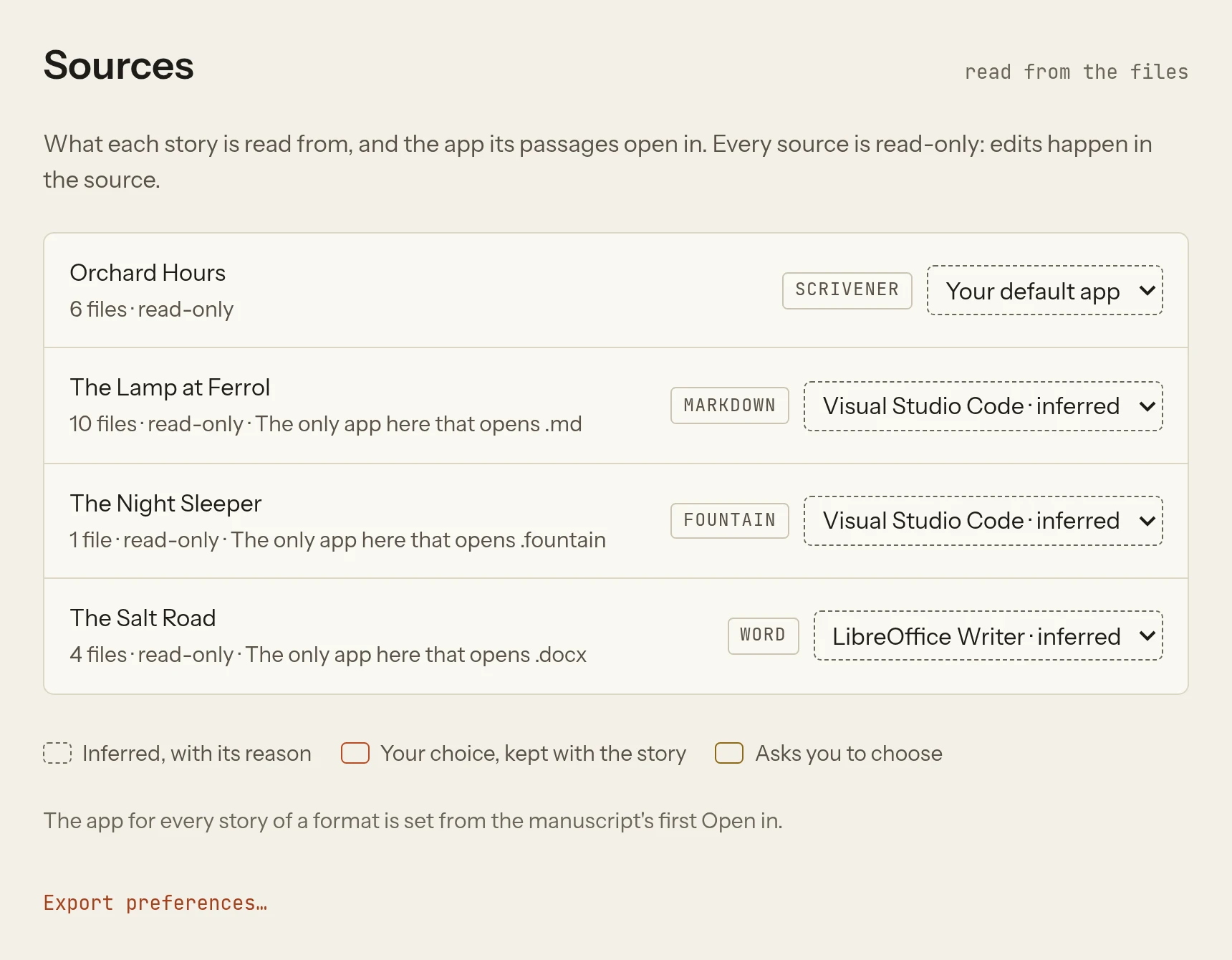
Settings, Sources: each story's source, read only, and the app its passages open in.
What decides which files belong to a story
A story is a folder in your writing home, declared once in Leathercase (see Declaring a story). Three things decide which of the folder's files it reads.
- Include patterns. A new story reads
**/*.md,**/*.fountainand**/*.docx: every Markdown, Fountain and Word file under its folder, at any depth. A Scrivener project's texts arrive as Markdown, so the same patterns take them in. - Ignore patterns. A pattern such as
_Work/**in Story settings leaves a folder out of every view. The Lamp at Ferrol leaves its_Work/folder of research and review notes out this way. - What each file is. Only the files declared as the story's prose make scenes. Character, place, item, faction and event notes are the cast and the world; plans, records, work notes, research and scraps are notes about the story. A file nothing claims is unsorted, and Leathercase asks about it instead of guessing. How a story is read explains the rules.
Some files are never read as the story, whatever the patterns say:
| Left out | Why |
|---|---|
Hidden files and folders, such as .obsidian, .git, .trash | They hold another app's own state, never prose |
Any suite/ folder holding Leathercase's files, Suite.md, the home's Writer/ cards folder | They are Leathercase's own files |
The story's note: a note whose front matter says story: true or a writing-target | It carries the story's settings, so it is read for those, not as a scene |
A note whose front matter says creative-writer: false | The Obsidian plugin's opt-out, still honoured |
Notes the Obsidian plugin wrote for itself (front matter keys that start with creative-writer-) | They were never prose |
| A folder the system will not let Leathercase read | Skipped, so one locked folder does not stop the rest |
Links to folders (shortcuts, symbolic links) are followed when they lead somewhere inside the home, and never out of it or round a loop.
Markdown
A Markdown note is Leathercase's native format, and the one the plugin's writers and Obsidian users already have.
- Front matter is read when it is there: the block between two
---lines at the top. Leathercase reads plain values, quoted strings and lists, inline ([a, b]) or one per line. Nested maps are kept as text and ignored. Nothing in it is required. Front matter lists every key Leathercase reads. - Headings split the note into scenes. Every heading, of any level from
#to######, starts a scene that runs to the next heading. Prose before the first heading is a scene too, named after the file. A heading with no prose under it is a scene planned, not yet written. - Links are read both ways:
[[wiki links]],[[Note#Heading]], and ordinary Markdown links to other notes. They resolve the way Obsidian resolves them, by file name first. - Comments are your asides and are never prose: Obsidian's
%% comment %%and HTML's<!-- comment -->. A heading inside a comment is not a scene. A tagged comment such as%% TODO: check the tide %%shows on the manuscript; see Comments and word lists. - Code fences are skipped: a
#line inside a fence is not a heading. - A
## Relationshipssection (or## Relationship,## Relations, at any heading level) in a character or place note is read as ties in the Graph, with a word and no type: one- [[Name]] — labelper line, until the next heading. Leathercase reads these lines and never writes them; ties you draw in the Graph go into Leathercase's ownGraph/Ties.md, and lines drawn on the old story map stayed inRelationships.md. - An
## Imagessection in a note of one of the story's own kinds (a symbol, a motif) lists the images Leathercase looks for in the prose.
Leathercase keeps a note's text as Windows saves it too: a byte order mark at the start and \r\n line endings read the same as anywhere else.
Word (.docx)
A Word file is read as if it were a Markdown note, from the styles you already use.
| In Word | Read as |
|---|---|
| Heading 1 to Heading 6 | # to ###### headings: each one starts a scene |
| Normal paragraphs | Prose, one paragraph each |
| Bold and italic | Kept as emphasis, so the dialogue and thought lenses can read them |
| The Quote and Intense Quote styles | Block quotes |
| Lists and tables | Their text, as plain lines |
| Everything else (fonts, colours, page layout, headers, footers, images) | Dropped from the reading; never changed in the file |
So a chapter whose scenes start with Heading 1 gives one row per scene on the plot grid. A chapter with no headings at all is one scene, named after the file.
A Word file has no front matter, so a Word character note is typed by its folder (Characters/, Places/ and the others) or by what you said the folder holds when you declared the story. The Salt Road shows both: its chapters in Chapters/, each scene a Heading 1, and its cast in Characters/ and Places/ as .docx notes.
The story's name. When the Word files agree on a title in their properties (in Word, File, Info, Properties, Title), Leathercase suggests it as the story's name when you declare it. Notes about the story can carry no title; only the chapters need one.
Scrivener (.scriv)
A Scrivener project is a folder (Orchard Hours.scriv) with a binder file and one RTF file per text. Leathercase reads the binder for the order and the titles, and each text for its words.
- Each text item is one note, at a path made from its place in the binder:
Orchard Hours.scriv/Manuscript/01 Friday/01 First Light.md. The.mdis Leathercase's own name for it; nothing is written to disk. - The Draft (whatever you titled it, Manuscript in the sample) keeps the binder's order: its items are numbered
01,02and so on, so the manuscript and the grid read in the same order Scrivener shows. - Folders in the Draft become the story's parts and chapters, as folders of notes would.
- Research and other top-level folders keep their titles without numbers, so a
Charactersfolder in Research is a folder of characters here too, and aPlacesfolder is a folder of places. - The Trash is left out, with everything in it: Orchard Hours' discarded "Old Opening" never reaches a view.
- Each text's RTF is read as paragraphs, with italic and bold kept as emphasis. Other formatting is dropped from the reading. A text with no headings is one scene, titled with its binder title.
- The story's name is suggested from the project's name,
Orchard Hours.
Both Scrivener 3 projects (texts in Files/Data/<UUID>/content.rtf) and Scrivener 2 projects (Files/Docs/<ID>.rtf) are read. Opening a passage from the manuscript opens the project in Scrivener, at the project rather than at the line, since Scrivener takes no line from outside.
Keep Scrivener's own sync in mind
Scrivener writes its project while it is open. Leathercase reads what is on disk, so a scene appears after Scrivener saves it. Leathercase never writes inside a .scriv project.
Fountain
Fountain is the plain-text screenplay format. Leathercase reads it as a screenplay, not as prose with odd capitals.
| In the script | Read as |
|---|---|
The title page (Title:, Credit:, Author: lines at the top) | The script's properties; a lone script's title is suggested as the story's name |
#, ##, ### sections | Scenes at their depth: acts and sequences |
Sluglines (INT. LIGHTHOUSE - NIGHT) | Scenes, one level below the deepest section; the place, Lighthouse, joins the cast of places |
Character cues (NORA (V.O.)) | The speaker, Nora, joins the cast and is present in that scene; extensions and the dual-dialogue mark ^ are not part of the name |
| Action, dialogue, lyrics, centred text | The scene's prose |
| Parentheticals, transitions, page breaks | Read for the structure, not counted as prose |
Synopses (= ...), boneyard (/* ... */), notes ([[ ... ]]) | Your asides, never prose |
A .fountain file is the story's prose by its format: it needs no folder or type to make scenes. The Night Sleeper in the sample library is one .fountain file with a title page, three # acts, sluglines, cues and synopses.
Exporting a Fountain story can give back the script exactly as written, joined in order; see Export.
Obsidian vaults
An Obsidian vault is a folder of Markdown notes, so Leathercase reads it as Markdown. Two things are different when the story sits inside a vault Obsidian knows on this computer:
- Settings, Sources names the source Obsidian instead of Markdown.
- Opening a passage from the manuscript opens Obsidian at the scene's heading. With the Advanced URI community plugin turned on in that vault, it opens at the line.
To find the vault, Leathercase reads Obsidian's own list of vaults on this computer and the vault's list of community plugins. It reads them and never changes them. The .obsidian folder itself is hidden, so nothing in it is read as a note.
Notes and front matter written for the Creative Writer plugin keep working: creative-writer: false, story: true, writing-target, type:, aliases: and the rest. See Front matter for the differences.
Output files of other writing software
Leathercase reads the files other writing apps leave on disk in the formats above, and nothing else:
| App | What Leathercase reads |
|---|---|
| Obsidian, iA Writer, Typora, Ulysses (exported), Bear (exported), any text editor | Their .md files |
Microsoft Word, LibreOffice Writer, Google Docs (downloaded as .docx), Pages (exported as .docx) | Their .docx files |
| Scrivener 2 and 3 | The .scriv project |
| Highland, Fade In, Slugline, Beat, WriterDuet (exported), any text editor | Their .fountain files |
| Final Draft | Not read directly; export the script as Fountain |
An app that keeps its writing inside a database or a single proprietary file (Ulysses' library, Final Draft's .fdx) has to export first. Leathercase reads the export; when you export again, Leathercase reads the new file the next time it looks.
When files change
Leathercase watches each open story's folder. A save in your writing app shows in Leathercase within moments, and the title bar says when the story was last read. On a disk that cannot report saves (some network and sync drives), Leathercase looks every few seconds instead and says so. If the folder cannot be read at all, the views keep the last reading and the title bar says the folder is lost. See The Desk for the heartbeat line.
See also
- How a story is read: prose, the cast, plans, unsorted files
- Front matter: every key Leathercase reads
- Files Leathercase writes
- Declaring a story