
Appearance
Privacy
Leathercase works offline. By default nothing leaves your computer: no account, no sign-in, no telemetry, no analytics, no crash reports, no usage counts sent anywhere. Your writing is read on your computer and Leathercase's own files are written next to it, in your writing home. This page lists the few things that can go online, each one only on your word, and where everything Leathercase keeps is stored.
What can leave your computer
| What | When | Where it goes | What is sent |
|---|---|---|---|
| The update check | Only when you choose Check now (in Settings, Updates or About) or Check for updates, or at launch once you turned on Check when Leathercase opens | Leathercase's public releases page on GitHub | A request for the list of the newest version's files. Nothing about you or your writing |
| An update download | Only when you choose Download after a check | The same releases page | A request for the installer file |
| The meaning search model | Only when you choose Download in Search by meaning, or in Settings, Search | Hugging Face, where the model is published | A request for the model's files. Nothing of your writing |
| A link you open | When you click a link to a web page, such as the download page | Your web browser | What your browser sends for any page |
Each of these is an ordinary web request, so the server sees what any website sees, such as your computer's internet address. None of them carries your name, your stories, your notes or anything about how you use Leathercase.
Nothing else in Leathercase goes online. The window itself is not allowed to load anything from the internet: its pages, fonts and images all come from inside the app, and a link that would open another page in the window goes to your browser instead, and only over https.
Updates
Leathercase asks which version is newest only when you say so; Settings, Updates says it in its first line: Leathercase goes online for one thing only, to ask which version is newest, and only when you say so. Nothing about you or your writing is sent. Check when Leathercase opens is off until you turn it on, and even then a check only marks Settings with a dot; nothing downloads by itself. See Updates and uninstalling.
Meaning search
Word search always works, offline, in the find field. Meaning search, which finds passages that say the same thing in other words, needs a small model. Leathercase does not ship it and does not fetch it until you agree.
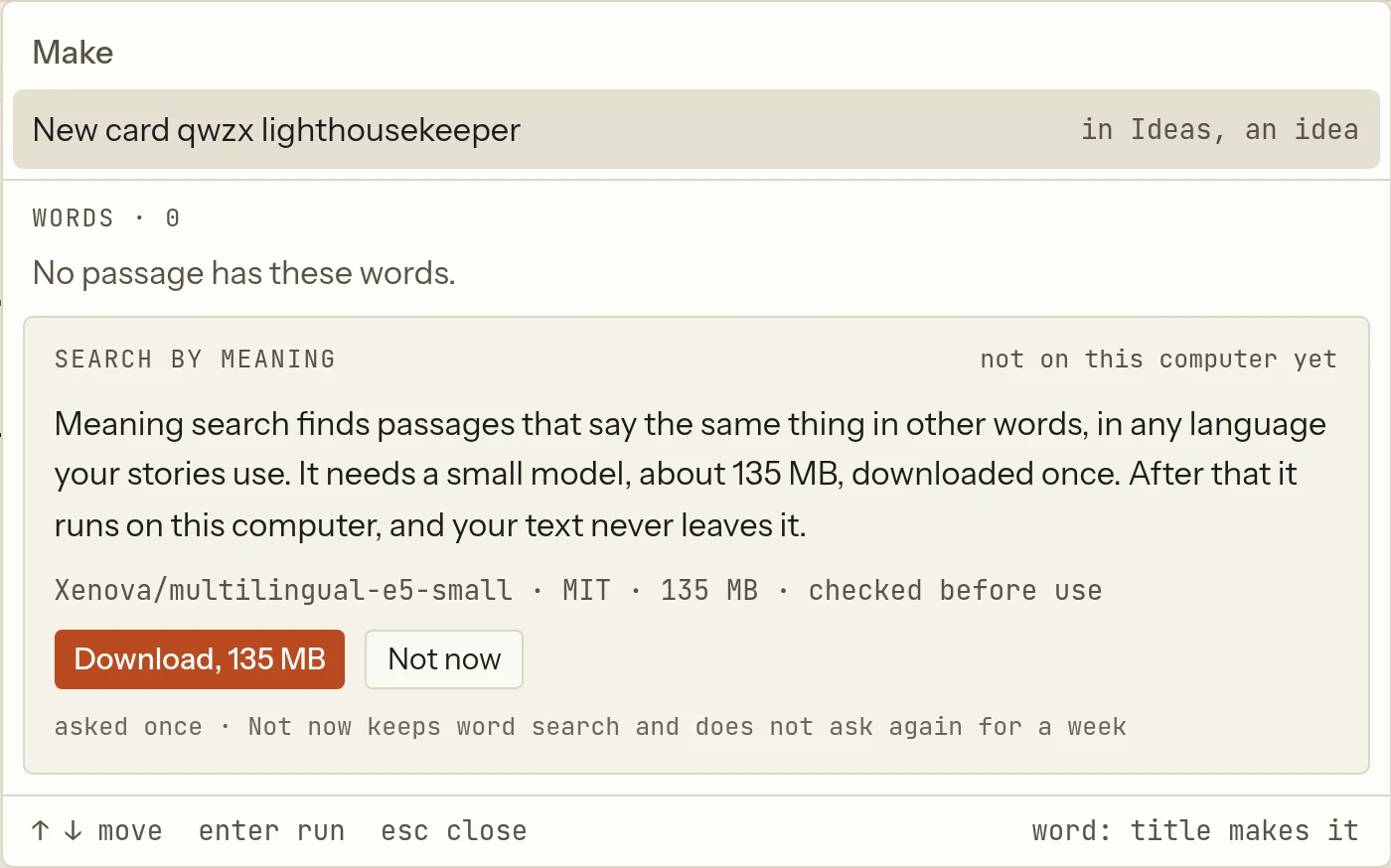
- The first time a search in the find field (
Ctrl+K, orCmd+Kon macOS) finds none of your words, Leathercase asks once, in a box under the results: Search by meaning, with the line Meaning search finds passages that say the same thing in other words, in any language your stories use. It needs a small model, about 135 MB, downloaded once. After that it runs on this computer, and your text never leaves it. - Download fetches the model (multilingual E5 small, MIT licence) from Hugging Face, at a fixed version, and checks every file against its known fingerprint before using it. Pause and Resume work mid-download; Cancel removes what came.
- Not now keeps word search and does not ask again for a week.
- Once downloaded, the model runs inside the app. Leathercase reads your stories to index them, on this computer; the index is kept in memory only and never written to disk.
- Settings, Search shows whether the model is on this computer and its size, and Remove deletes it.
Intel Macs cannot run the model, so Leathercase never offers the download there; word search works as always.
The mate
The mate is Leathercase's own assistant. It reads your stories with Leathercase's rules, on this computer, and wakes no model. Settings, The mate says so: Model turns come with a later paid service. Until then the mate wakes no model. What it notices stays in your writing home (suite/assistant/) and in this computer's app data. See The mate.
Agents
An agent is an AI assistant that runs in another app, such as Claude Desktop, Codex, Claude Code, Cursor or Gemini CLI. An agent reaches your stories only if you connect it, and only through Leathercase.
- On this computer only. Leathercase listens for agents on a private local channel (a socket only your user account can open, or a named pipe on Windows), never on the network. ChatGPT cannot connect for now: it reaches only servers on the internet, and Leathercase will not relay your stories through one.
- Only what you grant. Each agent has its own token and sees only the writing homes you chose for it. No tool it can call takes a path on your computer, runs a command or writes your files. Proposals wait in the inbox until you accept them.
- Every call is logged. Each call an agent makes is written to that agent's log in the story's
suite/logs/assistant/, kept 90 days. Settings, Agents, Log shows, call by call, what it asked for and What left Leathercase, with the words read each day. You can pause every agent at once, or revoke one; its next request is turned away. - What Leathercase cannot control. Once an agent has read a scene, what its own app does with it is that app's business: most send it to the company that runs the model. Many agents can also open files and run commands on their own, outside Leathercase. Grant an agent only the homes you mean to share, and read what your agent's own tools allow. See Connect an agent.
Setting up an agent other than Claude Desktop uses npx -y leathercase-mcp, which that agent's app downloads from the npm registry: the small bridge it starts to find Leathercase. That download is made by the agent's app, not by Leathercase.
Sync
Leathercase never uploads anything itself. When your writing home sits in a Dropbox, iCloud Drive, OneDrive or Google Drive folder, or in a git repository, that tool carries both your stories and Leathercase's files, as it would any other files. Settings, Storage names the sync tool it finds in the folder's path, or says the folder lives on this computer only.
The writing and sentence logs in suite/logs/ are named after the computer that wrote them, such as 2026-10-06.apollo-desktop.jsonl, so two computers never write the same file. Your computer's name therefore travels with the home to wherever it syncs.
What Leathercase reads besides your stories
| What | Why |
|---|---|
| Obsidian's list of vaults on this computer, and a vault's list of community plugins | To open a passage in Obsidian at the right note and heading |
| The writing apps installed on this computer | To offer them in Open in |
| Your system's languages | To choose the app's language when it follows the system |
| Your computer's name, once | To name this computer's log files |
All of these are read, never changed, and never sent anywhere.
What is stored where
| Kept | Where | Synced with your home |
|---|---|---|
| Your manuscripts and notes | Your writing home, untouched | By your sync tool, as always |
| Leathercase's files for your stories: grid, threads, cards, comments, settings, layouts, logs, agents' findings | Suite.md, suite/ and Writer/ in your writing home, and a suite/ folder in each story | Yes |
| This computer's preferences, the list of homes and where each lives, keys, agent tokens and grants, the mate's memory, the meaning search model | The app's data folder on this computer | Never |
Files Leathercase writes lists every file. To remove Leathercase's files from a home, use Settings, Storage, Remove…, Purge; to remove the app and its data from the computer, see Uninstalling.