
Appearance
Files Leathercase writes
Leathercase never writes into your manuscript or your notes. It does write files of its own: the plot grid you shape, the threads you name, the cards you make, the settings of each story, and the records it keeps so it can tell what changed. This page lists every one of them, where it lives, what it holds, whether it syncs, and whether you can delete it.
The rule behind the list: everything Leathercase keeps is a small file you can open without Leathercase, and it lives with your stories. Markdown for what you write through Leathercase, versioned JSON for structured records, and no database. Only what belongs to this one computer stays in the app's own data folder.
The shape of a writing home
Here is the sample library after a few days of use, with Leathercase's files marked. Your own files are left exactly as they were.
Sample/                                   your writing home
├── Suite.md                              Leathercase's: marks the folder as a writing home
├── suite/                                Leathercase's: the home's own files
│   ├── Library.json
│   ├── Writer.json
│   ├── Author.json
│   ├── Tags.md
│   ├── CharacterSections.md
│   ├── daily/                            a copy of every suite folder, one per day
│   └── logs/
├── Writer/                               Leathercase's: your cards, one note each
│   ├── A lamp that lies.md
│   ├── What do we owe the drowned.md
│   └── Templates/                        your graph templates, shared by every story
├── The Lamp at Ferrol/                   your story, read only
│   ├── The Lamp at Ferrol.md
│   ├── Characters/  Places/  Act I - The Dark Lamp/  ...
│   └── suite/                            Leathercase's: this story's files
│       ├── Story.json
│       ├── PlotGrid.md
│       ├── StoryThreads.md
│       ├── Comments.md
│       ├── Graph/                        Ties.md and one file per graph tab
│       ├── Beats/
│       ├── Characters/  Places/  Events/  Notes/
│       ├── snapshots/
│       ├── assistant/
│       ├── logs/
│       └── ...
├── The Salt Road/
│   └── suite/
├── Orchard Hours/
│   └── suite/
└── The Night Sleeper/
    └── suite/
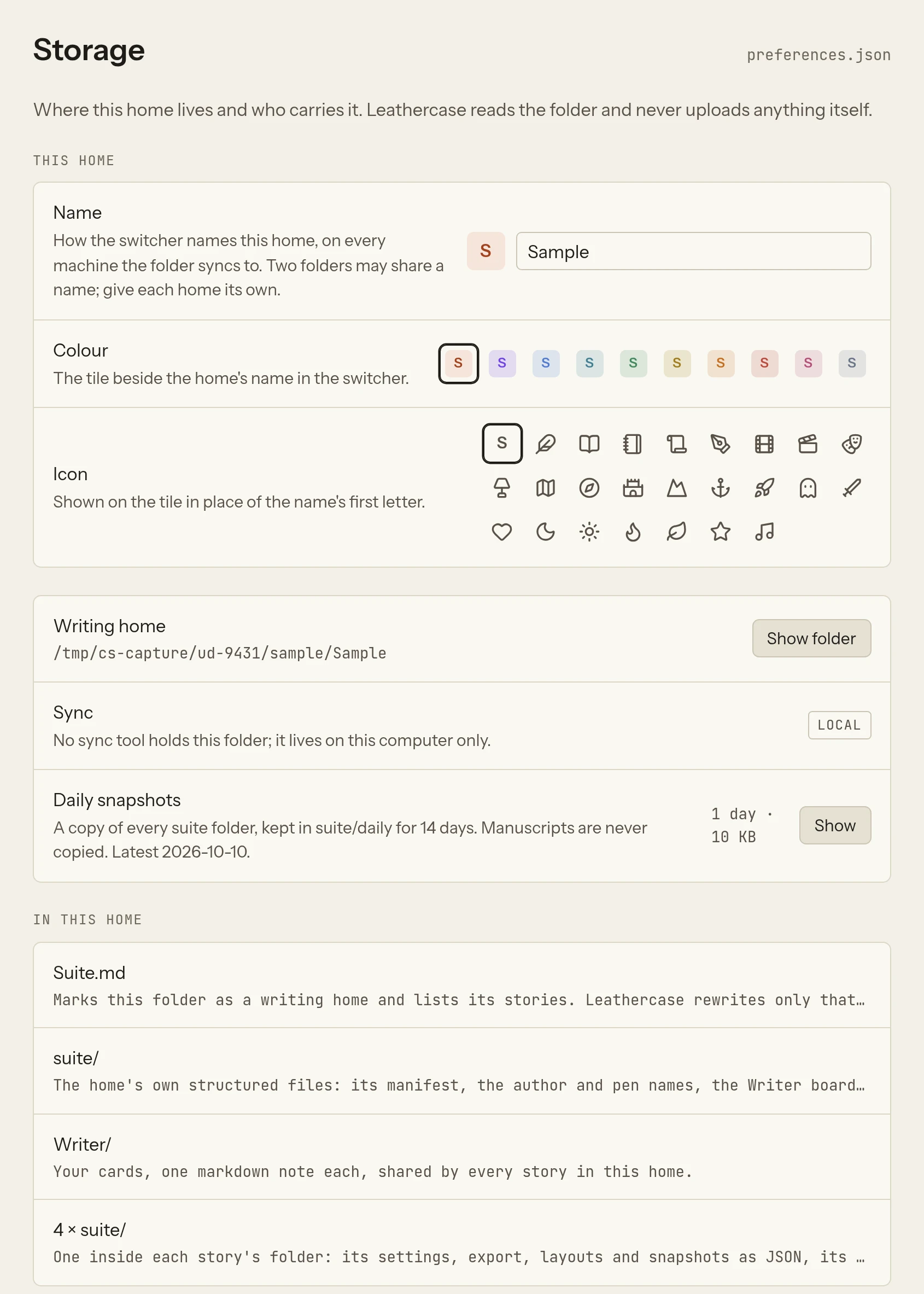
Leathercase shows the same summary in Settings, Storage, under In this home: Suite.md, suite/, Writer/ and one suite/ folder inside each story's folder.
The kinds of file
| Kind | Who writes it | Format | Where | Syncs |
|---|---|---|---|---|
| Author data | You, through Leathercase: the grid, threads, cards, comments, settings, layouts | Markdown with front matter, and JSON | suite/ at the home's root and in each story's folder, Writer/ for cards | Yes, with your stories |
| Assistant data | The mate or an agent you connected: findings, comments, proposals | JSON and Markdown | suite/assistant/ in each story's folder | Yes |
| Machine data and logs | The app, as a side effect of reading: baselines, snapshots, the writing log | JSON and JSON Lines | suite/ and suite/logs/ | Yes |
| This computer's | The app: where your homes are, preferences, keys, agent access, the search model | JSON and model files | The app's data folder | Never |
Author data and assistant data are kept apart on purpose. Your views are built from author data alone. Turn the assistant's layer off and what is left is exactly what you made.
A folder named suite that holds a Library.json or a Story.json is Leathercase's, anywhere in the home, and is never read as prose. A folder of yours that happens to be called suite and holds neither is read like any other folder.
At the home's root
| File | Kind | What it holds |
|---|---|---|
Suite.md | Author data | Marks the folder as a writing home and lists its stories in words: each story's name, its folder and what it reads. Leathercase rewrites only the list, between the marks <!-- suite:stories --> and <!-- /suite:stories -->; the rest of the note is yours to write in. Its front matter says leathercase: home and the home's id. |
Writer/ | Author data | Your cards from the Writer Board, one Markdown note each, named after the card's title. A card's front matter carries its list as a tag (tags: [writer/idea]), its kind (kind: idea) and the day it was made (created: 2026-09-29); its body is the card's text, and the notes it references are links under a ## References heading. A note of your own that you put in Writer/ is read as a card when it carries a writer/ tag, and stays yours. |
Writer/Templates/ | Author data | The Graph's templates you saved, one Markdown note each, marked leathercase: graph template, with what a tab made from it shows, its layout, roles, tie types and checks. They sit with the cards so that one template serves every story in the home. If you chose another folder for the cards, the templates follow them. |
In the home's suite/ folder
| File | Kind | What it holds |
|---|---|---|
Library.json | Author data | The home's manifest: its id and name, the colour and icon of its tile in the switcher, the folder your cards go in when you chose one, its stories, the folder each story lives in and each story's name. Leathercase reads the home from this file, not from Suite.md. The name, colour and icon are set in Settings › Storage › This home, and travel with the folder to every computer that syncs it. |
Writer.json | Author data | The Writer Board's framework (its layers, lists and colours), where cards and lists sit, the names you gave lines between cards, and the view. The cards themselves are the notes in Writer/, so a lost Writer.json costs positions and line names, never a card. |
Author.json | Author data | Settings, Author: your legal name, contact, agent and pen names, shared by the home's stories and used on the title page of an export. |
Tags.md | Author data | What you said about your tags in the Tags view: a colour, a line of description and the old names a tag was known by, one ## tag section each. |
CharacterSections.md | Author data | The sections the Characters view adds to a character's note when you ask, one per line. Until it exists the defaults come from the app's language. |
daily/ | Machine data | Daily snapshots: once a day, when Leathercase reads the home, every suite/ folder of the home (the home's and each story's) is copied into suite/daily/YYYY-MM-DD/ at the same path. Fourteen days are kept. Manuscripts are never copied, since your own tools keep those. Settings, Storage shows the days kept and their size, and Show opens the folder. |
logs/ | Logs | Events that concern the whole home rather than one story, such as an agent's calls about it. |
.history/ | Machine data | The previous version of Tags.md or CharacterSections.md, kept before Leathercase writes over it. See Kept versions. |
In each story's suite/ folder
Every declared story gets a suite/ folder inside its own folder, so its grid, threads, comments and records travel with it. Move the story's folder and its files move with it.
Markdown you write through Leathercase
| File | What it holds | Written by |
|---|---|---|
PlotGrid.md | The grid file: one heading per part (#), chapter (##) and scene (###), with a comment under a scene for its summary. A hidden source: line links a row to the scene of your prose it stands for; a row without one is a planned scene. An id: line names the row for Leathercase: leave it with its heading. Made from the story the first time it is read (the first time any of its views opens), carrying in the planned scenes of an older Outline.md, and never rewritten by a change in your prose: the grid asks you what a new or vanished scene should become. | Plot grid |
StoryThreads.md | Your threads: ## Arc: [[Nora Vidal]], ## Theme: ..., ## Subplot: ... and free threads, with one line per stop. The grid's cells and the threads chart both write here. | Threads, Plot grid |
Comments.md | Comments you leave on the manuscript, one ## [[Note#Scene]] heading per scene and one line per comment, anchored by a quoted sentence. A trailing check mark resolves a comment. | Comments and word lists |
WordLists.md | Your own overused words, one ## heading per list with its words under it and an optional colour: #hex line. | Comments and word lists |
Accents.md | How each character speaks: a ## heading per character, a says: line and a never: line. Read alongside the accent: and accent-never: keys of a character's own note. | Lenses and style checks |
Relationships.md | Lines drawn on the old story map, and lines an agent drew, read by the Graph as ties with a word. | Graph |
Graph/Ties.md | Every tie you draw in the Graph, one per line, with its type, word and details. | Graph |
Graph/<tab>.md | A graph tab, marked leathercase: graph tab: the template it came from, what it shows, its layout and grouping, the groups you folded, its backdrop, the name it centres on, the display and forces you set (spacing, tie length, centre pull, name scale), its roles, corner values and named groups, and a copy of its template's tie types and checks. Whole story, the first tab, has a file only once you change it. | Graph |
Graph/<tab>.layout.json | Where you put names in a tab, by layout. Delete it and the layout is worked out again. | Graph |
Facts.md | Facts about the story you accepted from an agent's proposal. | Proposals and the inbox |
Beats/ | The beat board's cards, one note each, named after the card. Front matter says which beat it sits in (beat: Midpoint), the tags you gave it and the day it was made; the body is the card's text. A card sent to the grid also carries a link to its scene. | Beat board |
Characters/, Places/, Events/, Notes/ | Notes Leathercase made at your word: a character, place or event made from the find field or from a name the Graph found without a note, and the note Leathercase keeps beside a note of yours, where the grid writes its sections. Each carries type: and the day it was made; the body is yours to fill. The Lamp at Ferrol's suite/Characters/Nora Vidal.md sits beside your own Characters/Nora Vidal.md. | Find, open and make, Characters, Graph |
Kinds/ | The note Leathercase keeps beside a note of one of the story's own kinds, as Kinds/Symbol/Mirrors.md, holding its images. | How a story is read |
Templates/ | The plot grid templates you saved, one note each, marked leathercase: template. Graph templates are kept for the whole home in Writer/Templates/. | Plot grid |
.history/ | Earlier versions of these notes. See Kept versions. |
Each Markdown file Leathercase starts says so in its front matter (leathercase: plot-grid, story-threads, comments, relationships, ties, graph tab, facts, accents), so a script or another app can tell what it is. You can open and edit any of them in your own editor. Where Leathercase rewrites part of a file, it fences that part with HTML comments such as <!-- suite:grid --> and <!-- /suite:grid -->, which no Markdown reader shows; everything outside a fence is yours. If you break a fence by hand, Leathercase writes nothing into that file until you mend it.
Choosing another folder
Story settings, Leathercase's files go in, can send this story's Markdown files (the grid file, threads, comments, beats and notes) to another folder of your choice, inside the home or elsewhere. The JSON records stay in the story's suite/ folder.
Structured records
| File | Kind | What it holds |
|---|---|---|
Story.json | Author data | The story's declaration: its id, name, folder, include and ignore patterns, where its Markdown files go, and every story setting (target, deadline, daily goal, writing days, language, dialogue and thought marks, speakers, ignored names, other names and pronouns you confirmed, plot columns, what each folder holds, your own kinds, the story's mark and colour). This file is the story. |
StoryMap.json | Author data | The old story map's pinned nodes and view, from before the Graph; nothing writes it now. |
GridLayout.json | Author data | How the plot grid is laid out: the columns you hid or folded, how far the frozen block runs, grouping by chapter, and what the gauge draws. Older homes have PlotGrid.json, read once and replaced on the next save. |
Threads.json | Author data | How the threads chart is laid out. |
BeatBoard.json | Author data | The beat board's template, your own columns and the order of the cards. |
Export.json | Author data | How this story leaves as a file: the format, font, paper, how chapters are cut and headed, part pages and the running header's keyword, as chosen in Settings › Export. The pen name the story is published under is kept in Story.json. |
Names.json | Machine data | The named notes the last reading knew, and the renames waiting for your answer. |
Reading.json | Machine data | A digest of the last reading, so the next one can say what changed. |
Words.json | Machine data | The last word count of each file, which the next reading measures new words against. |
Sentences.json | Machine data | The text the Sentence log compares the next sitting with. |
snapshots/ | Machine data | Grid snapshots, one per day as PlotGrid YYYY-MM-DD.json, which the grid opens as read-only tabs beside Now. |
WritingLog.json | Machine data | Only in stories older than the logs: read once and imported into logs/writing/, then left as it is. |
Assistant data: suite/assistant/
Present only once the mate or a connected agent has left something.
| File | What it holds |
|---|---|
Findings.json | Findings an agent or the mate left on a scene, each anchored by a quote that must appear in the scene: open, dismissed or taken. |
Comments.json | Comments an agent left, until you take one into your Comments.md or dismiss it. |
changesets/ | Proposals waiting in the inbox: <id>.json, the exact changes, and <id>.md beside it, a copy you can read, in the story's language. |
Readings.json | An agent's reading of a scene, in its own few sentences: who is there, what happens, what changes. Any agent reads it back instead of the prose until you change the scene. Never the scene's text, and never shown in a view. |
SceneReadings.json | Readings of scenes a model produced for the old story map, kept apart from your Graph. Read, no longer written. |
Nothing in this folder changes your views until you accept it.
Logs: suite/logs/
Logs are events in time, written one line at a time and never edited, as JSON Lines: one small JSON object per line, one file per day and per writer.
suite/logs/
  writing/2026-10-06.apollo-desktop.jsonl      words per reading, and which scenes changed, from this computer
  sentences/2026-10-06.apollo-desktop.jsonl    the sentence log's changes
  assistant/2026-10-06.mate.jsonl              every call the mate made
  assistant/2026-10-06.claude-desktop.jsonl    every call an agent made
Each computer and each agent writes only its own file, named after it, so two computers syncing one folder never write the same file and never make a conflicted copy. The writing and sentence logs are kept for good, since they are your progress and your cut sentences. Agent logs are kept 90 days.
The writing log has two kinds of line: words, the words added and cut in a file at a reading, which the progress counts come from; and scene, a scene that changed, with the words added and cut in it, which tells an agent which scene you worked on last. A scene line for a change found when Leathercase opened carries since, the time Leathercase last read the story before it.
The sentence log you read in the app is rendered from logs/sentences/. Leathercase no longer writes a Sentence log.md; one left by an older version is imported into the log once, the first time the story's log is touched, and then left as it is.
Kept versions
Before Leathercase writes over one of its Markdown files that you may have written in (the grid file, threads, comments, word lists, accents, the Graph's ties and tabs, beat cards, the notes it made, cards, templates, Tags.md), it copies the file as it was into a hidden .history/ folder beside it, as PlotGrid 2026-10-06 08.29.40.md. Copies older than 30 days are let go of; the newest copy of each file always stays. They are plain Markdown: to go back, open one and copy what you need.
Every write is whole or nothing: Leathercase writes a new file beside the old one and swaps it in, so a crash or a full disk never leaves half a file. A file Leathercase cannot read, because a sync is half done or a hand edit broke it, is left as it is: Leathercase says so and writes nothing over it.
Older files it still reads
| Older file | Read as |
|---|---|
Story threads.md in the story's own folder | The threads, until StoryThreads.md exists in suite/; the first change writes the new file and leaves the old one where it is |
Outline.md in the story's folder or in suite/ | Its planned scenes are carried into PlotGrid.md the first time the grid file is made. Leathercase never writes Outline.md: New scene, Plan a scene and beat cards sent to the grid all write into PlotGrid.md |
PlotGrid.json | The grid's layout, until the next save writes GridLayout.json |
WritingLog.json | Imported once into logs/writing/ |
Sentence log.md | Imported once into logs/sentences/; never written again |
The Lamp at Ferrol in the sample keeps a hand-written Story threads.md and an Outline.md in its own folder, to show this.
On this computer only
What belongs to one computer stays out of your writing home: another computer may keep the home in another place, give the keys to other apps, or have its own agents.
| Where | System |
|---|---|
%APPDATA%\Leathercase | Windows |
~/Library/Application Support/Leathercase | macOS |
~/.config/Leathercase | Linux |
Inside it, in data/:
| File | What it holds |
|---|---|
preferences.json | The homes this computer knows and where each folder is; the app's language and theme; the sidebar and the mate's panel open or closed; the last passage you had open in each home; where Capture to Writer sends a capture; the app each format opens in; appearance, lenses, manuscript and new-story settings; the kind colours; the two keys that work anywhere; whether to check for updates at launch; the mate's preferences; this computer's name in the logs. A copy, preferences.json.bak, is kept before each change. Export preferences…, at the foot of every Settings page, saves a copy wherever you choose. |
keybindings.json | Your changes to the keys, and only your changes. Settings, Hotkeys, Edit keybindings.json opens it. |
keybindings.defaults.json | Every command and its default key, written for reference. |
agents.json | Which agents you connected and the homes each may read. |
agents/ | Each agent's token, the address the bridge finds the app at, and this computer's record of agent calls. |
mate/ | What the mate already told you, so it tells you once, and how often you use each command. |
models/ | The meaning search model, about 135 MB, only after you chose to download it. See Privacy. |
Beside data/, Electron keeps its own caches, and sample/ holds your copy of the sample library when you try it.
Two more places, both removed by uninstalling (see Updates and uninstalling):
- The updater's downloads, in
%LOCALAPPDATA%\@leathercasedesktop-updateron Windows,~/Library/Caches/@leathercasedesktop-updateron macOS and~/.cache/@leathercasedesktop-updateron Linux, only after you download an update. - On Linux, the AppImage adds a menu entry and its icon the first time it runs, so
leathercase://links reach it:~/.local/share/applications/leathercase.desktopand~/.local/share/icons/hicolor/512x512/apps/leathercase.png.
Files you export (a manuscript as Word, PDF, EPUB, Fountain or Markdown, an agent's log, your preferences) go where you choose in the save dialog, and nowhere else.
Syncing with Dropbox, iCloud Drive, OneDrive, Google Drive or git
Everything Leathercase keeps for your stories is in the writing home, so whatever carries the home carries Leathercase's files too. Put the home in your Dropbox, iCloud Drive, OneDrive or Google Drive folder, or in a git repository, and open it on each computer: the stories open as they were left. Settings, Storage names the sync tool it finds in the folder's path (detected), or says the folder lives on this computer only (local). Leathercase never uploads anything itself; the sync tool does.
The files are built for this:
- Small files, one per concern. Two computers rarely change the same file at the same moment.
- Logs never collide. Each computer writes its own log file.
- Conflicted copies are found. When a sync tool keeps two versions of one of Leathercase's files (Dropbox's "conflicted copy", iCloud's "Story 2.json", Google Drive's "(1)", OneDrive's "-LAPTOP", Syncthing's ".sync-conflict-"), Settings, Storage lists them under Conflicts with a dot on Storage. Compare shows the two side by side; Keep this computer's or Keep the copy settles it, and the side you let go of goes to the system's trash. Conflicted copies of your manuscripts are your sync tool's to reconcile; Leathercase only looks at its own files.
- Daily snapshots in
suite/daily/let you undo a bad sync by hand.
With git, commit the suite/ folders, Suite.md and Writer/ with your stories. You may leave suite/daily/ and the .history/ folders out of the repository, since git already keeps every version.
What is safe to delete
Leathercase never needs you to delete anything. If you want to tidy up, this is what each loss costs.
| Delete | What you lose | Rebuilt |
|---|---|---|
suite/daily/ | The daily copies | Today's copy is taken again the next time the home is read |
.history/ folders | Earlier versions of Leathercase's notes | New versions are kept from the next change |
snapshots/ | Grid snapshots of earlier days | Today's is taken again |
Reading.json | What changed since the last reading, once | Yes, at the next reading |
Names.json | Pending questions about renamed notes | Yes, at the next reading |
Words.json | The baseline for new words: the next reading starts counting afresh | Yes |
Sentences.json | The sentence log's baseline: changes since it was written go unlogged | Yes |
Graph/*.layout.json, StoryMap.json, GridLayout.json, Threads.json, BeatBoard.json, Writer.json | Layouts: where you put names in a graph tab, the old map's pinned nodes, hidden columns, the beat board's columns and card order, card positions and line names | Defaults return |
suite/assistant/ | The mate's and agents' findings, comments and proposals | No |
suite/logs/ | Writing progress, the sentence log, agent call records | No |
PlotGrid.md, StoryThreads.md, Comments.md, Graph/Ties.md and the tab files, cards, templates and the other Markdown files | Your own work in Leathercase | No |
Story.json | The story's declaration and every setting: the story is no longer declared | No |
Library.json | The home's list of stories | No |
To remove everything Leathercase made in a home at once, use Settings, Storage, Remove…, Purge: it moves the home's Suite.md, every declared story's suite/ folder, the home's suite/ folder and the cards Leathercase made to the system's trash, and leaves your manuscripts and notes alone. Delete instead only takes the home off this computer's list and changes nothing in the folder. See Homes and stories.